 Vibe - One Wheel E-Bike
Electrical
Battery Management System
The BMS is responsible for monitoring, balancing, and protecting the 18S LiPo battery pack. It monitors individual cell voltages, output current, temperatures. It also performs cell balancing, and sends data frames containing the following data over a CAN bus:
- Cell voltages
- Pack voltage and current
- Charge Balancing status
- Temperature probe readings
The specific BMS being used in this project is the JFBMS32 Link which integrates well with the VESC tool ecosystem.
Configuring BMS in VESC Tool
Connect the JFBMS32 to your computer using the USBC port and configure it to these settings to make it ready for the Vibe battery/power configuration. The following table describes the values used for the Vibe, any settings not listed in the table below are left unchanged to their default values.
| Tab | Setting | Value | Notes |
|---|---|---|---|
| CAN | CAN ID | 3 | Unique CAN Bus ID. |
| CAN Baud Rate | 500K | Should be configured to be the same for all CAN devices on the bus. | |
| WiFi | Wifi Mode | Disabled | Vibe only uses the Bluetooth radio for now. |
| Bluetooth | Name | Vibe BMS | This name will show up as the device name when scanning bluetooth devices |
| Bluetooth Mode | Enabled | ||
| Bluetooth Pin Code | your pin code | Set it to something unique and memorable. | |
| General | Cells IC1 | 9 | Cells connected to IC1 of the BMS. |
| Cells IC2 | 9 | Cells connected to IC2 of the BMS. | |
| Cell Voltage empty | 3.10 V | Voltage at which the cell is considered to be fully discharged. | |
| Cell Voltage full | 4.20 V | Voltage at which the cell is considered to be fully charged. The voltage values are specific to lithium polymer batteries (lipo), if you change battery chemistry (eg, LiFePo4 etc), update these values appropriately. | |
| Temperature Sensors | 4 | Connect all 4 NTC sensors and probe them to the battery pack in different locations. (one on each pack) | |
| Charging | Max Charge Current | 8.0A | Maximum current output of your battery charger power supply. It is important to set this to the maximum number of your charger specifications or the BMS will enter Fault Over Current state. |
| Balancing | Max Balance Channels | 1 | Maximum number of cells balanced at the same time. |
| Sleep | Block Sleep Mode | False | When True this prevents the BMS from going into Sleep mode, which is helpful during initial debugging/setup but will consume more power from the batteries if left on. |
Wiring Diagram
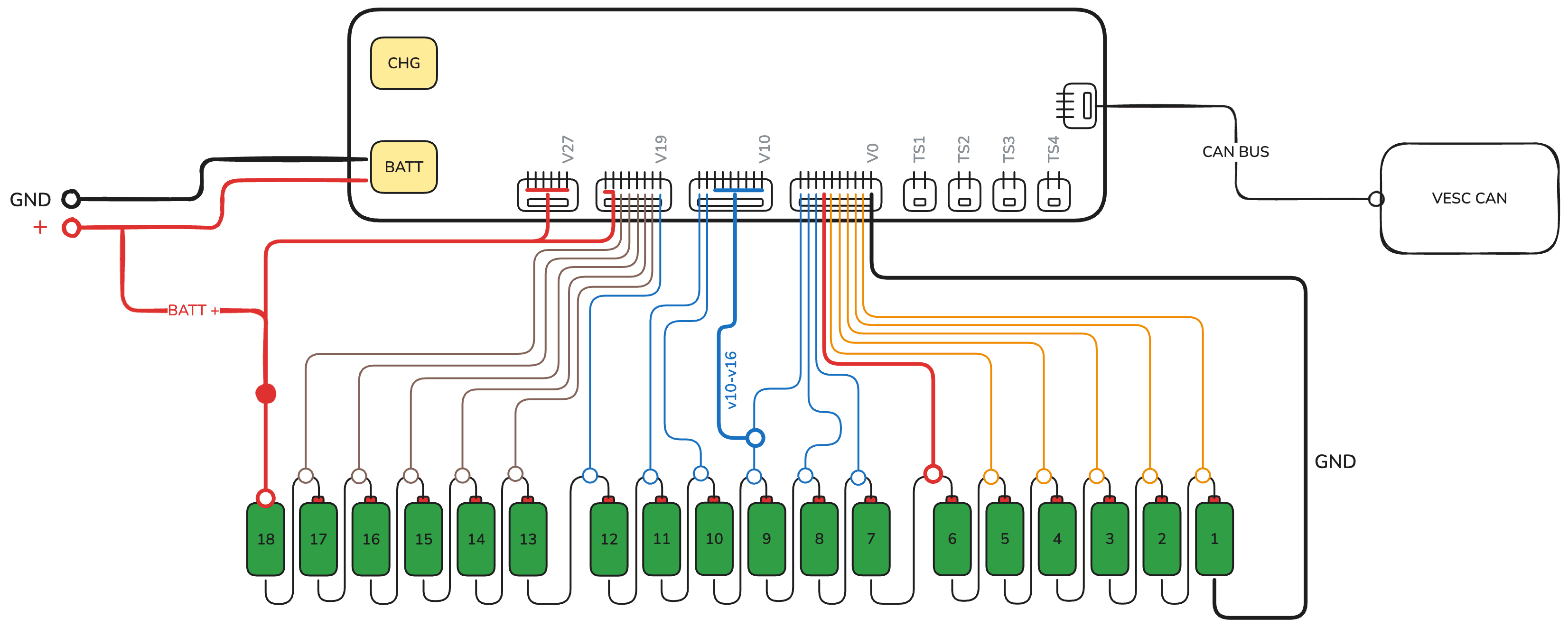
Troubleshooting notes
- The BMS has
30 secondsduring initial wiring to initialize theBQ76952chips before it goes to sleep, so it is important to make the connections of the Balance lead connectors and battery in, quick to avoid starting over. - To make sure the Motor Controller and BMS can communicate over CAN, set their Baud Rates to same and their CAN IDs to be unique.
- The balance connector order (Cell 1 → Cell 18) must be verified with a multimeter before connecting to BMS, where each lead reads increments of around 4 volts from the previous one.